


How To Order

Well if you're reading this then hopefully you've seen something that you like. For that you are already one of our favourite people.
Now all you've got to do is do is.
Step 1. Download the order form.
Step 2. Print out the order form
Step 3. Fill it in as clearly as possible
4. Scan it or take a photo and send it back to us at: fancythathandcrafted@outlook.com
Step 5. You’ll receive a reply confirming the receipt of your order. Please note that this is not order confirmation.
Step 6. You will then receive another email later on confirming your order and containing payment details and a lead time on your order.
Step 7. Once payment has been received your order will start to be crafted
We realise that this might seem a bit involved and perhaps even a bit old school in this digital age. As a small business all our costs have to be passed on to you the customer and so we try to keep them as low as possible. So we have taken the decision not to pay extra for the full ecommerce website
Fill in your name, address, email address and phone number.
PERSONAL DETAILS

07123 000000
SANTA CLAUS
SANTACLAUS@NOTHPOLE.COM
WORKSHOP 1
NORTH POLE
How To Fill In Your Order Form
We know. Every one hates filling in a form. Even the simplist of ones can have you putting the wrong name in the wrong box and we realise that we have a lot of options and that ours can potentially get quite confusing. We know because we tested it out on lots of people first!
So in an effort to make life easy we've included a guide to filing in your Christmas order form. We hope it helps.

If you have people in your party who are sensitive to noise or pets that run and cower under the bed at the bang and would like to leave the snap out then tick this box. If the bang (is it a bang or is it a crack if it's a cracker? we're not sure) is half the fun then you can ignore this bit.
STEP 1: PICK YOUR DESIGN

Pick the design you would like (we've added pictures in case you've forgotten the name of the designs) and write the number of crackers that you would like of that design in the box underneath.
X
6

Pick the selection group that you would like your gifts to come from by putting the number of gifts you would like in the green box next to the title of that selection group and we will send you a random selection of gifts from that group.
STEP 2: PICK YOUR GIFTS

6
If you would rather pick the gifts that go into your crackers yourself then just put a tick next to the gifts that you want. If you'd like multiples of any gift then just put the number of that gift next to the tick.
6
X
X
X
X
X
X
IF you'd rather have a game than a gift in your crackers than put the number of crackers you want at the top and then put a tick in the box next to the name of the game.
X
6
Want gifts in your crackers but still want a game to play too? Put the quantity you want in the box next to the game you'd like.
Want something for the dog and cat in your life? To pick one of our dog or cat crackers put the number of crackers you'd like in the green box next to the picture.
Don't want any extras ignore this section and move on to step 4.
STEP 3: EXTRAS

2
1
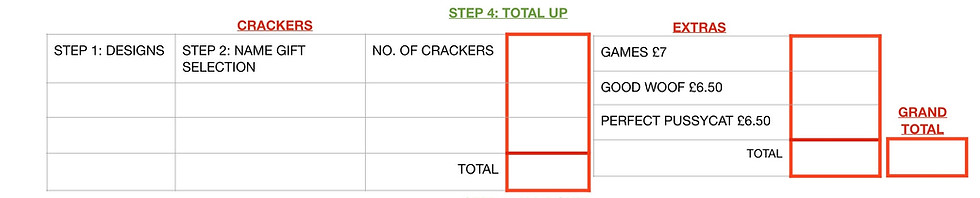
Now it's time to add up your order